Migrating from Combine to AsyncStream
A practical map from Combine to Swift async sequences: subjects to AsyncStream, sink to for await, @Published to @Observable and Observations. Plus five differences from publishers that break code if you miss them, for iOS 17 and iOS 26 targets.
for await state in states looks like a direct replacement for .sink.
It's close, but not the same. Async sequences and publishers differ in three places: who receives each value, what happens to a value nobody is listening for, and which object keeps which one alive.
I've migrated real code from Combine to async sequences without breaking anything, mostly because I checked those three things first. Here's the mapping, then the differences.
Why leave Combine at all?
Combine still works, and nobody is forcing you out. But it was designed before Swift Concurrency, and it shows:
- Publishers and subjects aren't
Sendable, so strict concurrency in Swift 6 turns manysinks into a wall of warnings. receive(on:)is a runtime promise. Actor isolation is a compile-time one.- Cancellation is manual (
AnyCancellable,store(in:)). With.taskin SwiftUI, it's automatic.
The compiler can check async code. It can't check a Combine pipeline. That's the main reason to migrate.
The cheat sheet
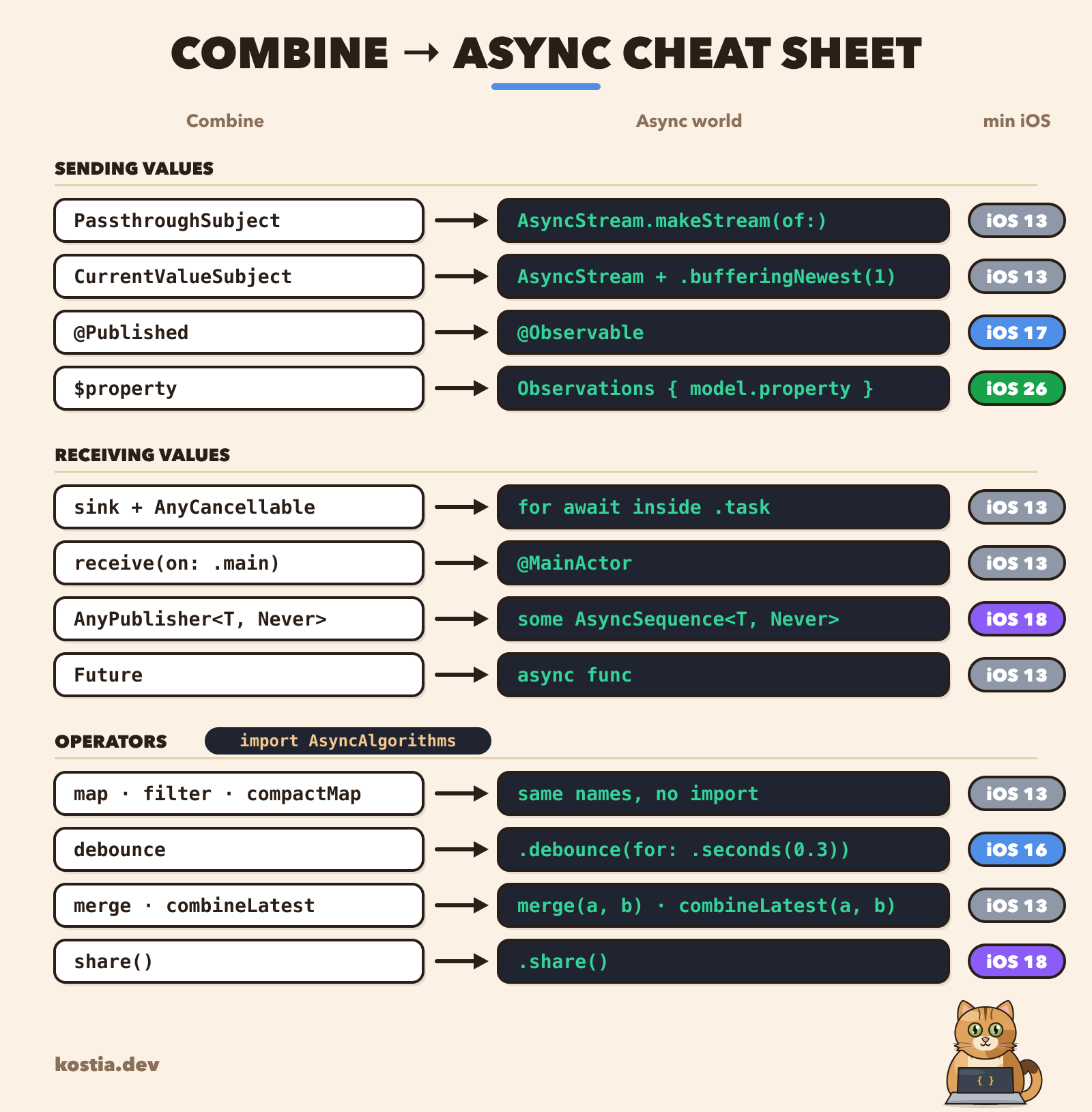 Combine → async cheat sheet
Most rows are a direct swap. The rest of the article covers the ones that aren't.
Step 1. Replace a subject with a stream
Let's take a typical service that pushes connection changes through a subject:
swift// Before: Combine
final class ConnectionMonitor {
  private let subject = PassthroughSubject<ConnectionState, Never>()
  var states: AnyPublisher<ConnectionState, Never> { subject.eraseToAnyPublisher() }

  func didChange(to state: ConnectionState) {
    subject.send(state)
  }
}
AsyncStream.makeStream(of:) gives you the stream and its continuation as a pair, which is exactly the subject shape:
swift// After: AsyncStream
final class ConnectionMonitor: Sendable {
  let states: AsyncStream<ConnectionState>
  private let continuation: AsyncStream<ConnectionState>.Continuation

  init() {
    (states, continuation) = AsyncStream.makeStream(of: ConnectionState.self)
  }

  func didChange(to state: ConnectionState) {
    continuation.yield(state)   // 👈 send(_:) becomes yield(_:)
  }

  deinit { continuation.finish() }   // ends every for-await loop on this stream
}
The class is also Sendable now, because both of its stored properties are.
Step 2. Replace sink with for await
The consumer side shrinks the most:
swift// Before: Combine
monitor.states
  .receive(on: DispatchQueue.main)
  .sink { [weak self] state in self?.state = state }
  .store(in: &cancellables)
swift// After: SwiftUI
.task {
  for await state in monitor.states {
    self.state = state
  }
}
No receive(on:): a SwiftUI view's body is @MainActor, so the loop runs on the main actor. No cancellables: .task cancels the loop when the view disappears, and cancellation ends for await.
The build succeeds, and the code reads top to bottom 🥳. Next: the differences that can break things.
Five differences from Combine
1. Two consumers split the values between them
With a PassthroughSubject, every subscriber gets every value. With AsyncStream, every value goes to one waiting consumer:
swiftlet (stream, continuation) = AsyncStream.makeStream(of: Int.self)

Task { for await n in stream { print("A got \(n)") } }
Task { for await n in stream { print("B got \(n)") } }

for n in 1...4 { continuation.yield(n) }
outputA got 1
B got 2
A got 3
B got 4
(The exact split depends on scheduling, and one task can even get all four. What never happens is both tasks receiving the same value.)
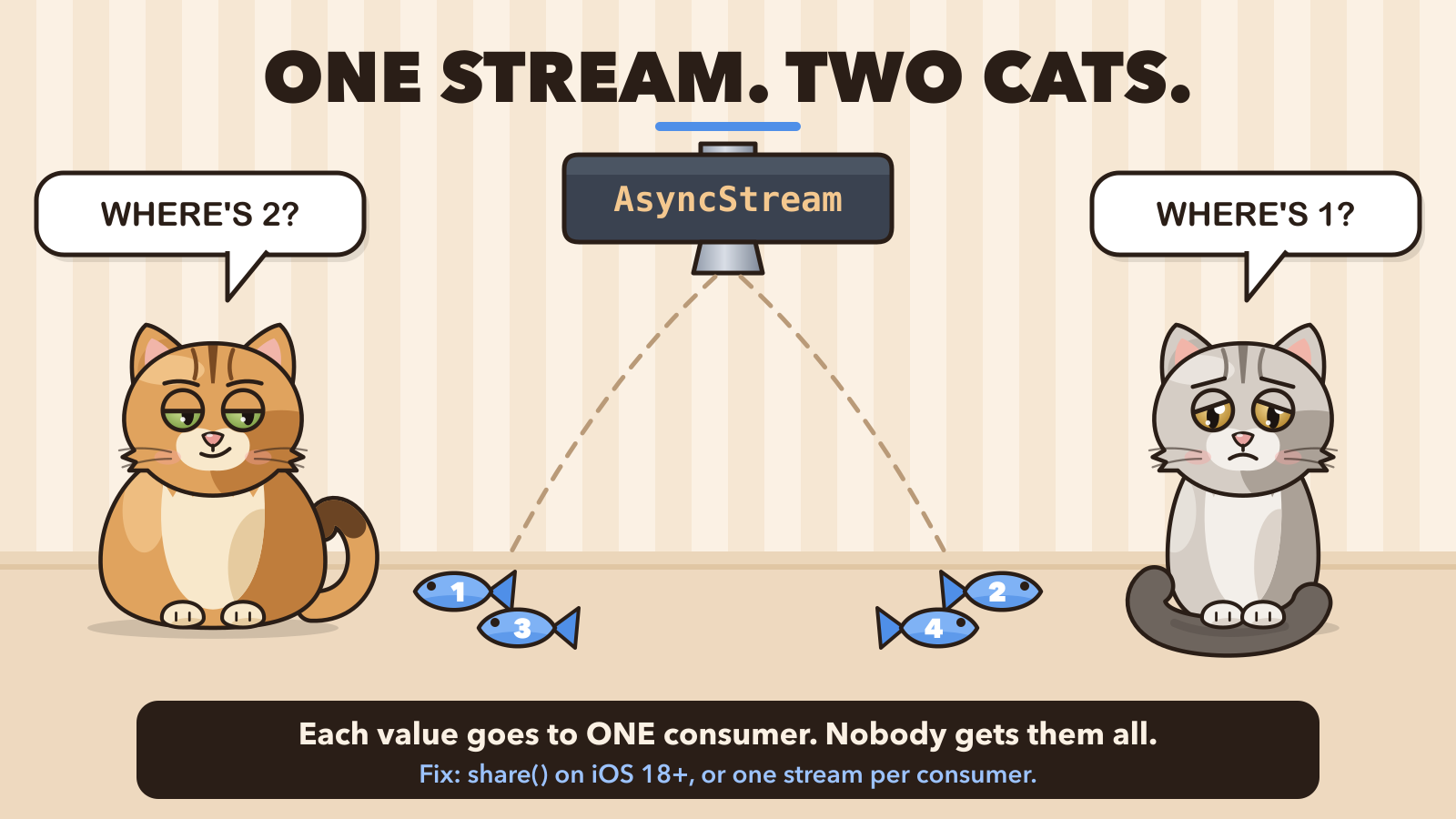 Sweetie and Mishell each get only half of the values
AsyncThrowingStream is even stricter. A second concurrent consumer crashes the app:
outputFatal error: attempt to await next() on more than one task
⚠️ Careful: this shows up when a service exposes one let states: AsyncStream and two screens observe it. It works with one screen, then a second screen "randomly" misses updates.
Fix on iOS 18+: swift-async-algorithms has share(), which turns any async sequence into one that every consumer sees in full:
swiftimport AsyncAlgorithms

let shared = monitor.states.share()   // 👈 iOS 18+, swift-async-algorithms 1.1+
Fix on iOS 17: give each consumer its own stream. A small broadcaster does it:
swiftimport os

final class Broadcaster<Element: Sendable>: Sendable {
  private let continuations = OSAllocatedUnfairLock(initialState: [UUID: AsyncStream<Element>.Continuation]())

  func stream() -> AsyncStream<Element> {
    let (stream, continuation) = AsyncStream.makeStream(of: Element.self)
    let id = UUID()
    continuations.withLock { $0[id] = continuation }
    continuation.onTermination = { [weak self] _ in
      self?.continuations.withLock { $0[id] = nil }   // 👈 unsubscribe when the consumer stops
    }
    return stream
  }

  func send(_ element: Element) {
    let current = continuations.withLock { Array($0.values) }
    for continuation in current { continuation.yield(element) }
  }
}
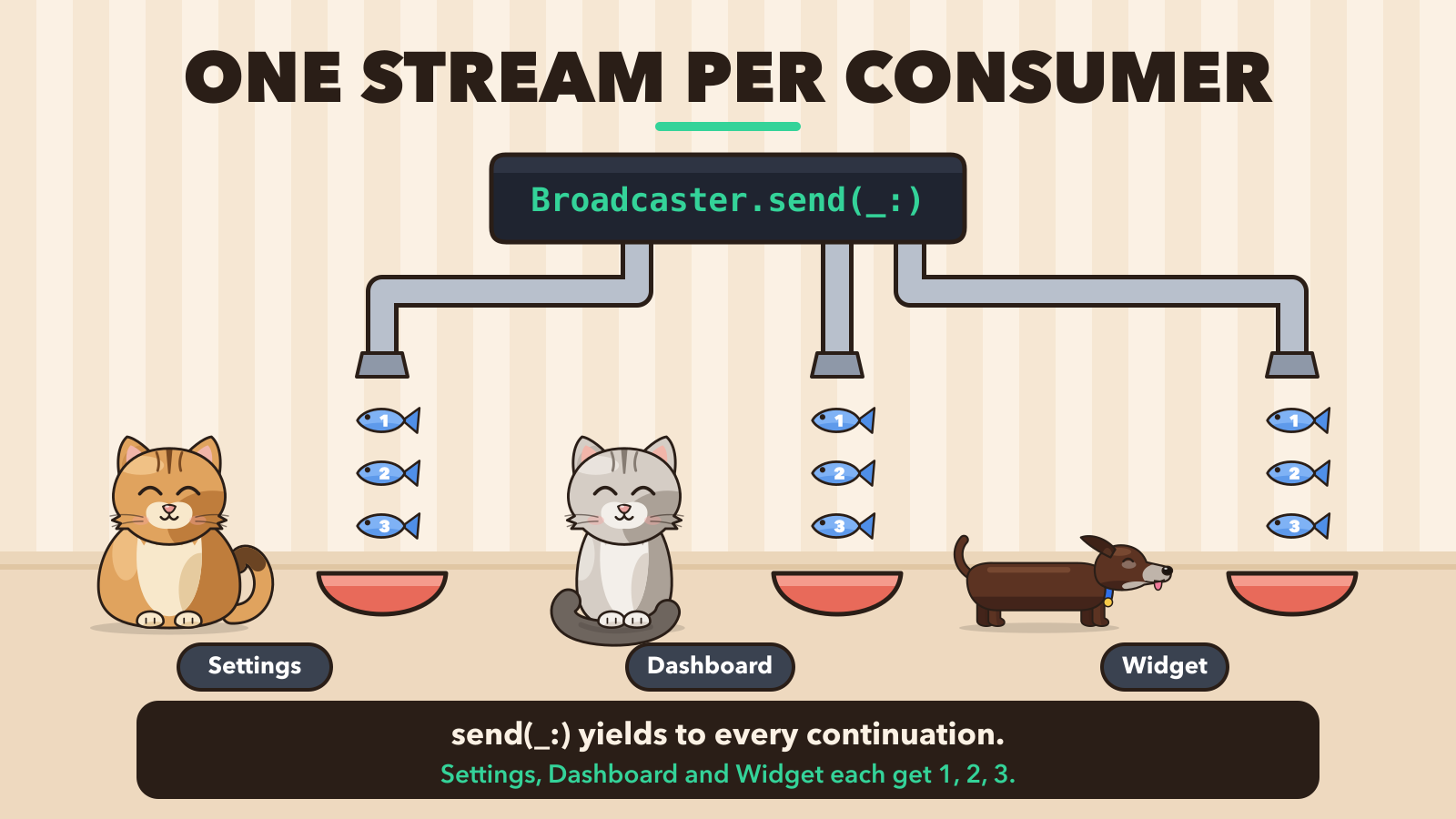 One stream per consumer: everyone gets 1, 2, 3
One continuation per consumer: that's what a subject did for you internally. On iOS 18+ you can swap OSAllocatedUnfairLock for Mutex from the Synchronization framework.
2. AsyncStream stores values until someone reads them
A PassthroughSubject with no subscribers drops values. An AsyncStream with no consumer buffers them, and the default buffer is unbounded.
So a stream that nobody iterates yet collects every value. The first consumer that starts iterating receives all of the stored values, and until then they stay in memory.
For "state" streams you almost always want only the latest value. That's also how you get CurrentValueSubject behaviour:
swiftlet (states, continuation) = AsyncStream.makeStream(
  of: ConnectionState.self,
  bufferingPolicy: .bufferingNewest(1)   // 👈 keep only the latest state
)
continuation.yield(.disconnected)        // the "current value" a late consumer gets first
💡 Hint: pick the buffering policy on purpose for every stream. .unbounded for events you can't lose (taps, messages), .bufferingNewest(1) for state.
3. The loop keeps running after the screen is closed
Outside SwiftUI, you start the loop yourself. This is the classic version:
swift// Before: leaks the view model
final class DashboardViewModel {
  private var task: Task<Void, Never>?

  func start() {
    task = Task {
      for await state in monitor.states {
        render(state)   // 👈 implicit strong self, for as long as the stream lives
      }
    }
  }

  deinit { task?.cancel() }   // never runs: the task keeps self alive
}
The task holds self, and the loop waits for values that keep coming, so the task never ends. deinit would cancel it, but deinit never runs. Combine had the same trap with sink { self... }; it's just less visible inside a for loop.
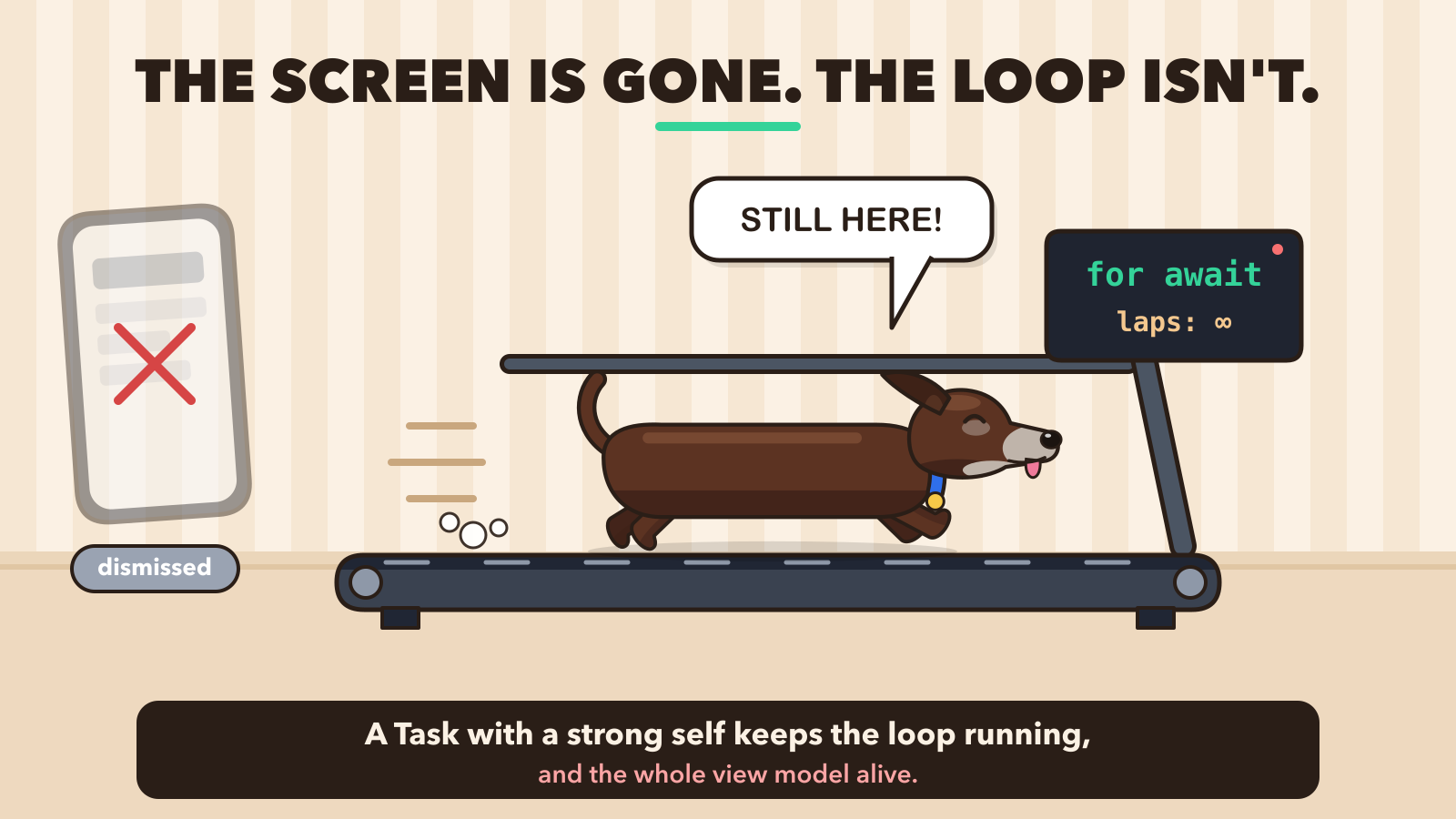 The screen is gone, but the for-await loop keeps running
swift// After: capture the stream, hold self weakly
task = Task { [weak self, states = monitor.states] in
  for await state in states {
    guard let self else { return }   // 👈 strong only for one iteration
    self.render(state)
  }
}
🧪 Try it: add a deinit { print("bye") } to your view model, dismiss the screen, and see if it prints. It's the quickest leak check I know.
4. debounce and combineLatest are not built in
The standard library gives you map, filter, compactMap, prefix, reduce and friends. Anything involving time or several sources lives in swift-async-algorithms:
swiftimport AsyncAlgorithms

let queries = searchField.texts
  .debounce(for: .milliseconds(300))   // iOS 16+: uses Clock
  .removeDuplicates()

for await (state, settings) in combineLatest(monitor.states, settingsStream) {
  render(state, settings)
}
It's maintained by Apple, so it's a low-risk dependency.
5. No AnyPublisher replacement on iOS 17
eraseToAnyPublisher() let you hide the concrete type. The async equivalent is an opaque type with primary associated types:
swiftvar states: some AsyncSequence<ConnectionState, Never> { ... } // iOS 18+
On iOS 17 the Failure associated type isn't available yet, so that line doesn't compile. Return the concrete AsyncStream<ConnectionState> instead. AsyncStream is already a reasonable abstraction, so you lose little.
@Published → @Observable, and Observations on iOS 26
For view models, the migration target isn't a stream at all. @Observable replaces @Published and ObservableObject, and SwiftUI tracks exactly the properties a view reads.
The gap used to be observing changes outside a view, which is what $property.sink was for. On iOS 26 (Swift 6.2), Observations fills it:
swift@MainActor @Observable
final class PlayerModel {
  var isPlaying = false
  var volume = 0.5
}

// iOS 26+
for await (playing, volume) in Observations({ (model.isPlaying, model.volume) }) {
  nowPlaying.update(isPlaying: playing, volume: volume)
}
Two details:
- It emits the current value on the first iteration, so there's no separate "initial" call.
- Changes are grouped into transactions. If you set
isPlayingandvolumetogether before the nextawait, the loop sees one update with both values, not two half-updated ones.
On iOS 17 there's no built-in sequence for this. withObservationTracking fires once per change and needs re-registering every time. If you only need it in one or two places, keeping that one $property publisher until you can raise the deployment target is a reasonable choice.
Migrate consumers first, then producers
You don't have to migrate everything at once. Every publisher has a .values property (iOS 15+) that turns it into an async sequence:
swiftfor await state in legacyMonitor.statesPublisher.values {
  render(state)
}
So: migrate consumers to for await first, then swap the producers one by one.
⚠️ Careful: .values requests one value at a time. If a PassthroughSubject sends while your loop body is still busy, that value is dropped. If a producer sends many values quickly, put .buffer(size:prefetch:whenFull:) before .values, or migrate that producer to AsyncStream first.
Takeaways
- Subjects become
AsyncStream.makeStream,sinkbecomesfor awaitin.task,@Publishedbecomes@Observable. AsyncStreamis single-consumer: useshare()on iOS 18+, or one stream per consumer on iOS 17.- Choose a buffering policy on purpose;
.bufferingNewest(1)is yourCurrentValueSubject. - A stored
Taskwith a strongselfand an endlessfor awaitis a leak. Capture the stream, holdselfweakly. Observations(iOS 26) closes the last big gap in moving off@Published.
Most of the migration is deleting code: no cancellables, no receive(on:), no type erasure. The five differences above are the parts that need real thought.
Thanks for reading! 🐾