Swift Package Registry: How It Works and Where It Bites You
Swift Package Registry promises faster builds and tighter supply-chain control — but the tooling has rough edges. Here's how it actually works, and where to watch out.
SPM clones entire Git repositories. Every dependency, every CI run, every new developer machine — full clone. For most packages that's fine. For something like SendbirdUIKit (over 2 GB), it's a multi-minute tax that compounds across every job in your pipeline.
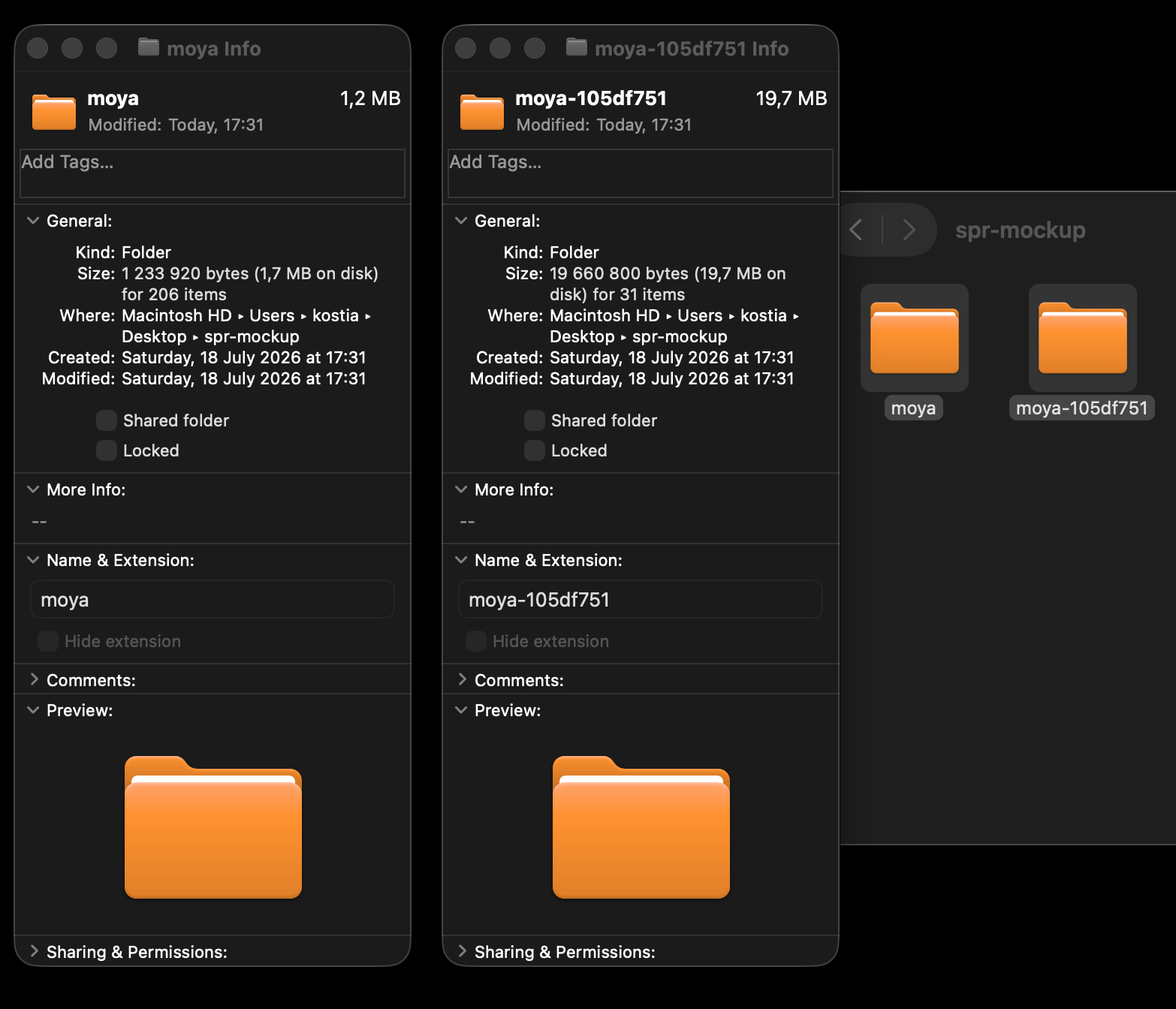 Finder showing Moya as a 1.2 MB registry zip vs 19.7 MB git clone, with Get Info windows open for both
moya from the registry (1.2 MB, 206 items) vs moya-105df751 from a git clone (19.7 MB, 31 items) — same library, same version.
Swift Package Registry is the answer to that problem. Instead of cloning, SPM downloads a versioned zip archive containing only the source for the release it needs. No history, no unrelated branches — just the code. In practice that can cut dependency resolution from minutes to seconds.
The spec has existed since SE-0292 (Swift 5.7). Adoption is still narrow, the tooling has real rough edges, and LLMs hallucinate about it constantly because there's so little written about it. This post tries to fix that.
What a Registry Actually Is
A registry is a server implementing the Swift Package Registry specification. It stores packages as versioned source archives and exposes a small REST API: list releases, fetch a manifest, download an archive, look up a package by its Git URL.
Packages in a registry are identified not by URL but by a package identifier:
scope.package-name
mona.LinkedList is the LinkedList package under the mona scope. The scope maps to an organisation or team. It also determines which registry SPM queries — more on that below.
Where to Actually Host One
Apple specified the protocol and implemented the client. Hosting is left to third parties. The main options today:
- JFrog Artifactory — the most widely used in enterprise setups. Supports local, remote, and virtual repositories.
- Tuist Registry — open, no account required, backed by Swift Package Index. The easiest to get started with for public packages.
- AWS CodeArtifact — good fit if you're already in the AWS ecosystem.
- Cloudsmith — hosted, private registries as a service.
Configuring SPM to Use a Registry
Registry configuration lives in a registries.json file, at either project or user level:
- Project level —
.swiftpm/configuration/registries.jsonin the package root. Only affects that project. - User level —
~/.swiftpm/configuration/registries.json. Applies to all projects for the current user.
Set a project-level registry:
bashswift package-registry set https://packages.example.com
Set it globally for your user account:
bashswift package-registry set --global https://packages.example.com
The resulting registries.json:
json{
  "registries": {
    "[default]": {
      "url": "https://packages.example.com"
    }
  },
  "version": 1
}
[default] means this registry handles any scope that doesn't have a more specific mapping. For most setups, a single default is all you need.
Scoped Registries
If different teams publish to different registries, you can scope the mapping:
bash# Only packages under the "foo" scope use this registry
swift package-registry set --scope foo https://internal.example.com
When resolving foo.LinkedList, SPM uses internal.example.com. For everything else it falls back to [default]. Project-level config takes precedence over user-level for the same scope.
Remove a registry assignment with swift package-registry unset.
Xcode caveat: Xcode projects don't support project-level registries. Use --global for anything you want Xcode to see, and avoid --scope — in practice Xcode only honours the default scope.
Declaring a Registry Dependency
Swap .package(url:from:) for .package(id:from:):
swiftdependencies: [
    .package(id: "mona.LinkedList", .upToNextMajor(from: "1.0.0")),
],
targets: [
    .target(
        name: "MyApp",
        dependencies: [
            .product(name: "LinkedList", package: "mona.LinkedList"),
        ]
    ),
]
SPM extracts the scope (mona), looks it up in registries.json, queries that registry for available releases, and downloads the source archive for the resolved version.
Authentication
If your registry requires credentials, use swift package-registry login:
bashswift package-registry login https://packages.example.com
SPM will prompt for a token or username/password. Credentials are saved to Keychain (macOS) or ~/.netrc and applied automatically on subsequent requests.
For non-interactive environments (CI), pass credentials directly:
bashswift package-registry login https://packages.example.com --token $REGISTRY_TOKEN
If your company allows unauthenticated reads from behind a VPN, you can skip this entirely for the pull side — only publishing needs credentials.
Migrating Existing Git Dependencies
This is where things get interesting. Your dependency graph is full of .package(url: "https://github.com/...") references, including in the Package.swift files of packages you don't control. You can't rewrite those. SPM has three modes to handle this:
| Flag | What it does |
|---|---|
--disable-scm-to-registry-transformation | Default. Git deps clone from Git, registry deps use the registry. No deduplication. |
--use-registry-identity-for-scm | SPM looks up each Git URL in the registry. If found, both references are treated as the same package — deduplicating across origins. |
--replace-scm-with-registry | SPM downloads source control dependencies from the registry when possible, falling back to Git only if the package isn't found there. |
--replace-scm-with-registry is the migration flag. It lets you publish packages to the registry once and immediately stop cloning them, without touching your Package.swift or your transitive dependencies' manifests.
The prerequisite that's easy to miss: for SPM to map a Git URL to a registry package, the package must have been published with a package-metadata.json that includes its repository URLs:
json{
  "repositoryURLs": [
    "https://github.com/mona/LinkedList",
    "https://github.com/mona/LinkedList.git",
    "git@github.com:mona/LinkedList.git"
  ]
}
If that metadata isn't there, SPM silently falls back to cloning. No error, no warning — it just clones. This trips up a lot of people who think --replace-scm-with-registry is a magic switch.
Making Xcode Use the Registry Too
For swift package resolve from the terminal, pass the flag directly. For Xcode, you have two options:
Set it per-scheme as an environment variable (IDEPackageDependencySCMToRegistryTransformation = useRegistryIdentityAndSources), or set it globally via defaults:
bashdefaults write com.apple.dt.Xcode IDEPackageDependencySCMToRegistryTransformation useRegistryIdentityAndSources
Undo with:
bashdefaults delete com.apple.dt.Xcode IDEPackageDependencySCMToRegistryTransformation
The scheme approach doesn't help during initial package resolution — Xcode resolves before loading the scheme. The defaults write approach is what actually works.
Publishing to a Registry
The canonical command is swift package-registry publish:
bashswift package-registry publish acme.Alamofire 5.10.1 \
  --url https://packages.example.com \
  --metadata-path package-metadata.json \
  --scratch-directory $(mktemp -d)
This creates a source archive from the current package, signs it (if a signing key is configured), and uploads it to the registry along with the metadata.
Don't try to upload the zip manually. It's tempting to download a GitHub release zip and push it directly with something like jf rt upload. Structurally it looks right, but SPM will fail to resolve it — the archive format and registry indexing require the publish command's output, not a raw zip. This is a known sharp edge.
For CI publishing, authenticate first:
bashswift package-registry login https://packages.example.com --token $REGISTRY_TOKEN
swift package-registry publish acme.Alamofire 5.10.1 \
  --url https://packages.example.com \
  --metadata-path package-metadata.json \
  --scratch-directory $(mktemp -d)
Security
Checksum TOFU
The first time SPM downloads a source archive, it records the checksum. On every subsequent download, it verifies the checksum matches. If it doesn't, the build fails. This is trust-on-first-use (TOFU) — it doesn't protect against a compromised first download, but it absolutely protects against the archive being silently swapped later.
Signed Packages
SE-0391 added package signing. When a registry response includes X-Swift-Package-Signature-Format and X-Swift-Package-Signature headers, SPM validates the signature against your trust store.
The source archive, the Package.swift, and any version-specific manifests are individually signed. SPM also enforces that the signing entity stays consistent across releases of the same package — so a new publisher can't silently take over an existing package identity.
How SPM handles unsigned or untrusted packages is configurable in ~/.swiftpm/configuration/registries.json:
json{
  "security": {
    "default": {
      "signing": {
        "onUnsigned": "prompt",
        "onUntrustedCertificate": "prompt",
        "trustedRootCertificatesPath": "~/.swiftpm/security/trusted-root-certs/",
        "includeDefaultTrustedRootCertificates": true,
        "validationChecks": {
          "certificateExpiration": "disabled",
          "certificateRevocation": "disabled"
        }
      }
    }
  }
}
The four behaviours for onUnsigned and onUntrustedCertificate:
| Value | Behaviour |
|---|---|
error | Reject and fail the build. |
prompt | Ask once; record the answer. |
warn | Allow with a warning. |
silentAllow | Allow silently. |
You can override these at the registry, scope, or individual package level, with more specific overrides winning.
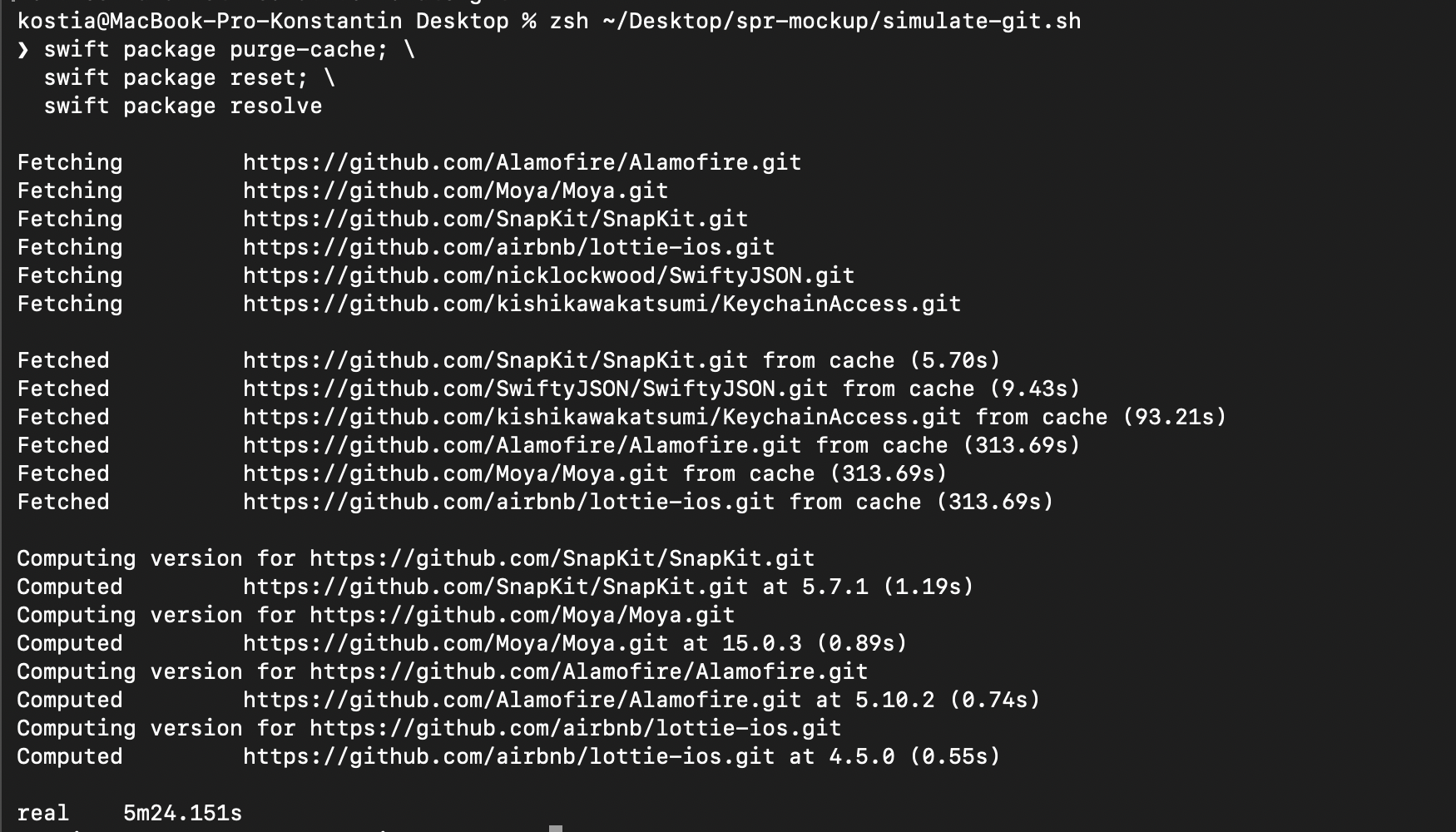 Terminal output of swift package resolve using git: fetching GitHub URLs, three packages taking 313.69s each from cache, total 5m 24s
Without a registry: three packages taking 313 seconds each from the git cache. Total: 5m 24s.
Terminal output of swift package resolve using git: fetching GitHub URLs, three packages taking 313.69s each from cache, total 5m 24s
Without a registry: three packages taking 313 seconds each from the git cache. Total: 5m 24s.
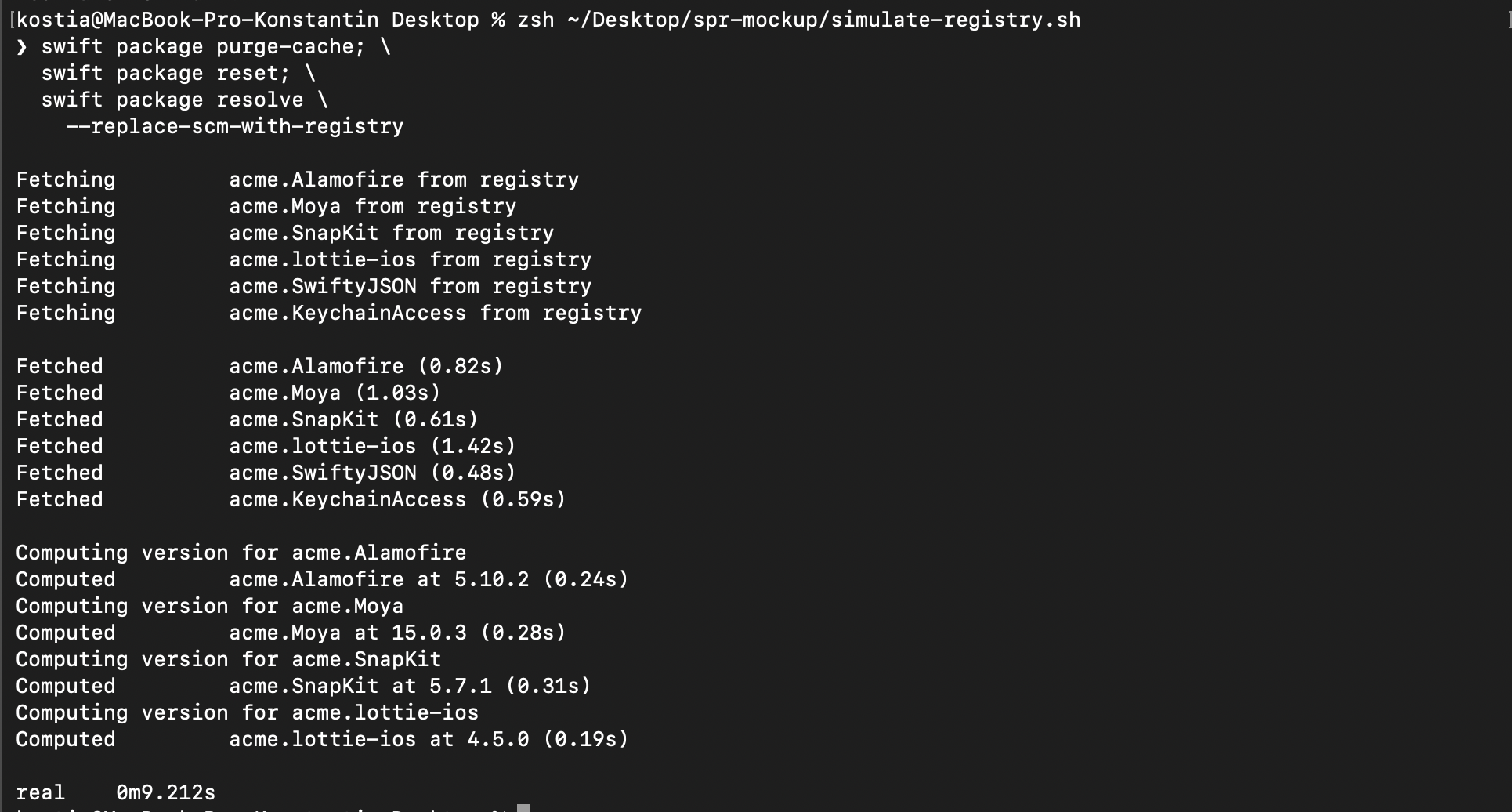 Terminal output of swift package resolve using a registry: fetching acme.* packages, all under 1.5s each, total 9.2s
With a registry and
Terminal output of swift package resolve using a registry: fetching acme.* packages, all under 1.5s each, total 9.2s
With a registry and --replace-scm-with-registry: same packages, same machine, same cold cache. Total: 9.2s.
Is It Worth It?
For teams where dependency cloning is a real cost — large monorepos, slow CI agents, dependencies with massive Git histories — yes, absolutely. The savings are not incremental; teams report going from multi-minute resolution to seconds.
For smaller teams with fast CI and no particularly heavy dependencies, the setup overhead may not pay off yet. The tooling works, but it still requires care, especially around Xcode integration and the --replace-scm-with-registry metadata requirements.
Either way it's worth understanding — adoption is growing, Tuist has made public packages accessible without any infrastructure cost, and the spec is stable. The hard part is no longer whether it works, but knowing where the edges are.